 VividPlay Arcade
VividPlay Arcade
VividPlay Arcade
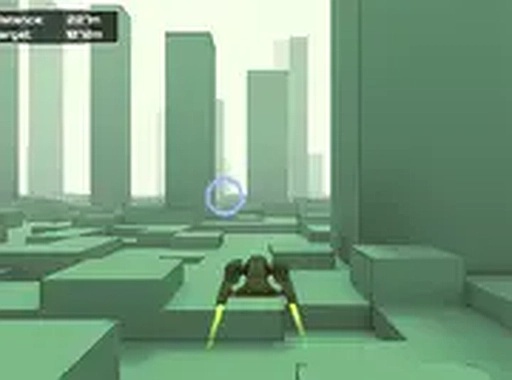
Neon Skyline Speedway stands out for its dynamic environment, where buildings shift in real time to create new challenges. The orb collection and upgrade system adds meaningful progression without slowing the pace. The clean 3D visuals and smooth performance make it an easy recommendation for browser-based racing fans. The global leaderboard provides a solid reason to keep improving.
The core challenge involves piloting a spacecraft through narrow passages between towering skyscrapers. The urban layout is not static; as you progress, the buildings begin to shift and reposition themselves, requiring constant attention and quick adjustments. The environment feels alive, with structures sliding into new configurations that test your ability to read the path ahead. This dynamic setting keeps each run feeling fresh, as the same route rarely appears twice.
Scattered along the flight path are glowing blue orbs that serve as the game's primary currency. Collecting these orbs adds to your total credit count, which can be spent in the in-game shop. The shop offers a range of performance enhancements for your spacecraft, such as improved maneuverability and increased resilience. These upgrades are essential for surviving longer runs as the speed and obstacle complexity increase. The progression system rewards consistent orb collection, giving players a tangible goal beyond simply avoiding collisions.
Built using Unity WebGL technology, the game delivers smooth 3D graphics directly in a web browser. The futuristic cityscape is rendered with vibrant neon colors and reflective surfaces, creating an engaging visual atmosphere. The frame rate remains stable even during high-speed sections, ensuring responsive controls. Full-screen mode is available to maximize immersion, and the game is optimized for desktop computers. The overall aesthetic is clean and family-friendly, with no dark or mature themes.
A global leaderboard tracks the best distances achieved by all players. This feature adds a competitive layer to the arcade experience, encouraging repeated attempts to climb the rankings. Your best run is automatically saved, so you can return later to try and beat your own record. The leaderboard serves as both a motivator and a benchmark, allowing you to see how your skills compare with others. It is a simple but effective way to extend the game's replay value.
The game gradually increases its speed and introduces more complex obstacle patterns as you progress. This demands sustained concentration and quick decision-making. Players must learn to anticipate building movements and plan their trajectory accordingly. The arcade-style scoring system rewards both distance traveled and orbs collected, so there is a constant incentive to balance risk and reward. Regular play can help improve hand-eye coordination and reaction times, making it a suitable choice for casual practice sessions.






Player Comments
Sign in to comment
You must be logged in before posting a review or rating.
No account? Create one
No comments yet. Be the first to comment!