 VividPlay Arcade
VividPlay Arcade
VividPlay Arcade
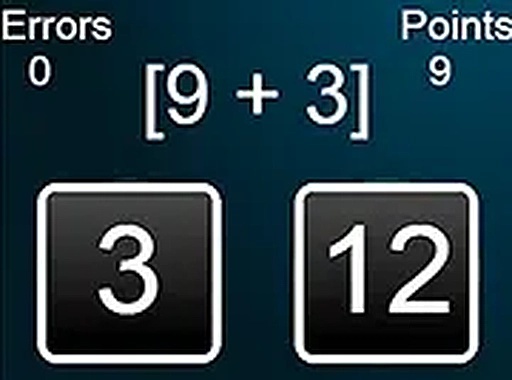
Arithmetic Challenge: Number Puzzles is built around a simple loop: solve a basic arithmetic problem, pick from multiple choices, and move on. The absence of timers and penalties makes it unusually forgiving, which suits learners who want repetition without stress. The tables practice mode and kids mode give the game some range, and the adaptive difficulty keeps problems from feeling either trivial or overwhelming. The minimal interface and lack of registration lower the barrier to entry. It is not a deep puzzle game, but as a lightweight math drill it is focused and accessible.
Every question in Arithmetic Challenge: Number Puzzles is a straightforward arithmetic problem. You read the expression, scan the multiple-choice answers, and tap or click the one you believe is correct. There is no clock running in the background, so you can take as long as you need before committing to an answer. Once you respond, the game immediately moves to the next problem, keeping the session flowing without interruption. That automatic transition is central to the experience: it removes the need to hunt for a continue button and lets you settle into a steady rhythm of question, answer, next question.
The game ships with several play modes, each aimed at a slightly different user. A tables practice mode zeroes in on multiplication and division facts, giving players a dedicated space to memorize the patterns that come up most often in everyday math. A kids mode takes a gentler approach, using larger text and brighter colors so that younger users can read problems comfortably and stay engaged. Across modes, the game watches how you perform and adjusts the difficulty accordingly, so the challenge stays within reach without becoming tedious.
Visually, the game keeps things minimal. Buttons are large, text is clear, and the layout responds to different screen sizes, which means it works on desktop computers, tablets, and smartphones without losing readability. Full-screen support is available for players who want to cut out distractions. There is no download step and no registration wall, so a session can begin the moment the page loads. [IMG_1]
Correct answers are acknowledged, and incorrect ones are noted without any penalty. That design choice turns mistakes into low-stakes learning moments rather than failures. Progress is entirely self-paced, and over time players can observe their own improvement in speed and accuracy. Because nothing punishes a wrong answer, returning for a short daily practice session feels easy rather than obligatory.
Sign in to comment
You must be logged in before posting a review or rating.
No comments yet. Be the first to comment!







Editorial Notes