 VividPlay Arcade
VividPlay Arcade
VividPlay Arcade
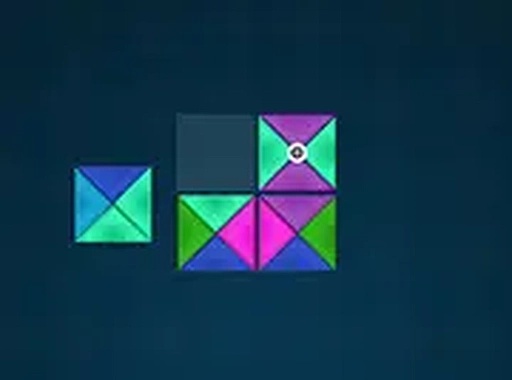
Hue Alignment Puzzle is a grid-based logic game about sliding colored blocks until every side matches its neighbor. Its strength is the smooth difficulty curve: small boards with few colors teach the rule, then larger, more crowded grids demand deeper planning. The minimal visual style and automatic progress saving make it easy to pick up for a few minutes. The main limitation is that the input does not describe any timer, multiplayer, or undo feature, so players seeking fast-paced or social puzzles may find it too quiet.
Every block on the board has colored sides, and the goal is to arrange them so each side touches a block of the same color. The board begins with gaps, and you slide one block at a time into an adjacent empty space. That single constraint sounds manageable until you realize each move alters which colors can legally touch next. The puzzle is less about finding a move and more about choosing the right order of moves.
Early puzzles use two or three colors on small boards, which lets you internalize the matching rule before the board gets crowded. Later puzzles add more colors and fill more of the grid, so you have fewer empty spaces to work with and more color relationships to track. Because each puzzle is a standalone arrangement built for logical deduction, the challenge grows through added complexity rather than sudden difficulty jumps. You rarely feel stuck because the next puzzle usually extends a skill you already practiced.
The visual design keeps the puzzle readable. Blocks are solid, distinct colors, empty spaces are clearly marked, and a subtle cue confirms when a block is correctly placed. That feedback loop matters in a game where a wrong move can require backtracking. A calm palette and gentle animations keep attention on the grid instead of on decorative effects.
Hue Alignment Puzzle runs in a browser with no download or installation. You click or tap a block, then click an adjacent empty space to move it. Most puzzles can be solved in a few minutes, so the game fits into short breaks, but the later puzzles reward longer sessions. Progress saves automatically, so you can leave an unfinished puzzle and return to it later.
Sign in to comment
You must be logged in before posting a review or rating.
No comments yet. Be the first to comment!




Editorial Notes