 VividPlay Arcade
VividPlay Arcade
VividPlay Arcade
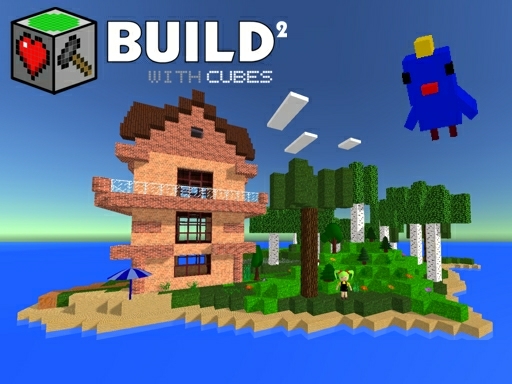
Creative Cube Builder 2 offers a relaxing and imaginative building experience. The intuitive controls make it easy for anyone to start creating. The landscape generation tools add variety, while features like portals and physics objects provide extra fun. It's a perfect game for families looking for a safe, creative outlet. The lack of pressure or time limits makes it ideal for stress-free play.
Creative Cube Builder 2 is a 3D sandbox game that invites players to construct and explore worlds made of cube blocks. The core objective is to encourage imagination and self-expression through open-ended building. What makes this game unique is its focus on providing a safe and family-friendly environment where players can design, decorate, and experiment freely. Whether you want to create a cozy dollhouse, a towering castle, or a bustling small town, the possibilities are limited only by your imagination. The game offers a voxel-based environment that supports creativity without any pressure or time limits, making it suitable for players of all ages.
In Creative Cube Builder 2, players typically start by placing and arranging cube blocks to form their creations. The controls are intuitive, allowing you to select blocks from a palette, place them in the 3D world, and rotate or remove them as needed. You can also generate a 3D landscape using adjustable settings such as seed, hill height, and width to create a unique terrain. To enhance your builds, you can add furniture, decor, and lighting elements. Special tools like fly mode and mirror functions help you build faster and more symmetrically. Additionally, you can create simple puzzles using portals and a portalgun, or add interactive physics objects like balls and trampolines for playful effects.
Creative Cube Builder 2 includes a range of features that support creative building and exploration. The core feature is the voxel-based sandbox, allowing free-form construction with cube blocks. Landscape generation tools let you customize terrain with adjustable parameters. You can add entities, animals, and objects to populate your world. The game also includes musical note blocks for composing simple melodies, portal mechanics for teleportation puzzles, and physics objects like TNT and trampolines for interactive fun. Fly mode and mirror building tools make construction more efficient.
To get the most out of Creative Cube Builder 2, start by experimenting with the basic block placement to understand the controls. Use the landscape generation settings to create a foundation that inspires your builds. Take advantage of fly mode to get a bird’s-eye view of your project and plan your layout. The mirror function is great for creating symmetrical structures like towers or houses. Don’t hesitate to add details like furniture and lighting to make your creations feel alive. Finally, try combining portals and physics objects to add interactive elements that make your world more engaging.






Player Comments
Sign in to comment
You must be logged in before posting a review or rating.
No account? Create one
No comments yet. Be the first to comment!