 VividPlay Arcade
VividPlay Arcade
VividPlay Arcade
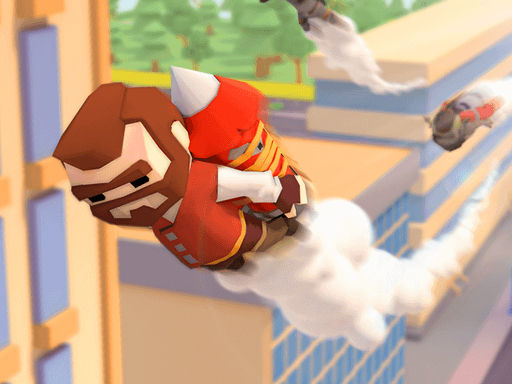
Jetpack City Flight Arcade keeps its scope narrow: one control gesture, one main collectible, and one landing goal per stage. That simplicity works in its favor for a casual audience, and the colorful city backdrop makes coin routes easy to read. The main limitation is variety—players who want complex mechanics or story will not find them here. It is best suited for short sessions and younger or relaxed players.
Jetpack City Flight Arcade uses a single input method: drag and release. Players pull back on the screen with a mouse or touch gesture, then let go to send their jetpack character into the air. The angle and length of the drag determine both direction and speed, so every launch is a small physics decision. A short drag produces a gentle hop; a longer pull sends the character arcing higher and farther. Because the same gesture controls everything, there are no separate buttons for thrust or steering—your finger or cursor is the entire control scheme.
Each stage has one clear goal: collect as many gold coins as possible before reaching the landing zone. Coins float at different heights and positions, encouraging players to adjust their flight path mid-air rather than drifting in a straight line. Buildings and birds act as obstacles. Hitting either one ends the attempt, so the safest coin route is not always the most rewarding one. The landing zone sits at the end of the stage, and touching down there completes the level. Later stages rearrange coin placements and add more obstacles, which shifts the challenge from simple collection to route planning under pressure.
The city below is colorful and readable, which matters because players need to spot coins and obstacles quickly while moving. The 3D perspective gives a sense of altitude without becoming disorienting. There is no combat, no timer visible in the description, and no penalty for taking a slow approach—just the risk of crashing. That combination makes the game approachable for younger players or anyone looking for a low-stress arcade experience. The difficulty curve comes from level design rather than mechanical complexity.
Sign in to comment
You must be logged in before posting a review or rating.
No comments yet. Be the first to comment!








Editorial Notes